AI时代, XII - 手搓第一个Skill
本文以node.js项目每次发布前都需要增加版本信息为例,说明如何创建一个Skill。
背景:对于node.js项目而言,版本信息通常有下列这些:
- Version在package.json;
- 其他用于节目上的Version信息,示例项目中使用environment.ts以及environment.prod.ts来维护Version信息。
首先,要创建一个skill文件夹:
mkdir -p .claude/skills/bump-version
其次,写一个skill文件(skill.md):
name: bump-version
description: Bump the knowledgebuilder app version across package.json and both environment files, refresh the release
date, verify the build, and optionally create a release commit. Invoke when the user asks to bump/release/version the
app.
---

# Bump Version

The version string lives in **three** places that must stay in sync, plus a `releasedate` field in the two environment
files:

| File | Field(s) |
|---|---|
| `package.json` | `version` |
| `src/environments/environment.ts` | `version`, `releasedate` |
| `src/environments/environment.prod.ts` | `version`, `releasedate` |

The footer (`src/app/shared/footer`) displays both `version` and `releasedate`.

## Version scheme

Semver `MAJOR.MINOR.PATCH` (e.g. `1.8.419`). PATCH is a running number, not strictly +1 — always confirm the target
with the user.

## Steps

1. **Determine the target version.** If the user gave an explicit version (e.g. `1.8.420`), use it. Otherwise ask
whether to bump `patch` / `minor` / `major` and compute it from the current `package.json` version.
2. **Apply the bump** by running the helper script — never edit the version fields by hand, so the three files cannot
drift:
    node .claude/skills/bump-version/bump-version.mjs <X.Y.Z>
This updates package.json, both environment files, and sets releasedate to today's date (YYYY-MM-DD).
3. Verify sync — confirm all three files report the same version:
grep -nE "version|releasedate" package.json src/environments/environment.ts src/environments/environment.prod.ts
4. Verify the build (recommended):
ng build --configuration development
5. Commit only if the user explicitly asks. Follow the repo convention from git history:
chore: bump version to <X.Y.Z>
5. Stage package.json, src/environments/environment.ts, src/environments/environment.prod.ts.

Notes

- If the user also wants a git tag, the repo currently has no tagging convention — ask first.
所以最终结构是:
.claude/skills/bump-version/
├── SKILL.md # skill instructions (invoke via /bump-version)
└── bump-version.mjs # helper that edits all 3 files + refreshes releasedate
而bump-version.mjs为:
// Bumps the project version in all three locations and refreshes the release date.
// Usage: node .claude/skills/bump-version/bump-version.mjs <X.Y.Z>
import { readFileSync, writeFileSync } from 'node:fs';

const newVersion = process.argv[2];
if (!newVersion || !/^\d+\.\d+\.\d+$/.test(newVersion)) {
  console.error('Usage: node .claude/skills/bump-version/bump-version.mjs <X.Y.Z>');
  process.exit(1);
}

const today = new Date().toISOString().slice(0, 10); // YYYY-MM-DD

// 1. package.json
const pkgPath = 'package.json';
const pkg = JSON.parse(readFileSync(pkgPath, 'utf8'));
const oldVersion = pkg.version;
pkg.version = newVersion;
writeFileSync(pkgPath, JSON.stringify(pkg, null, 2) + '\n');

// 2 & 3. environment files - update version + releasedate
const envFiles = [
  'src/environments/environment.ts',
  'src/environments/environment.prod.ts',
];
for (const p of envFiles) {
  let txt = readFileSync(p, 'utf8');
  txt = txt.replace(/(version\s*:\s*)'[^']*'/, `$1'${newVersion}'`);
  txt = txt.replace(/(releasedate\s*:\s*)'[^']*'/, `$1'${today}'`);
  writeFileSync(p, txt);
}

console.log(`Bumped ${oldVersion} -> ${newVersion} (releasedate ${today})`);
console.log('Updated: package.json, environment.ts, environment.prod.ts');
执行时候:
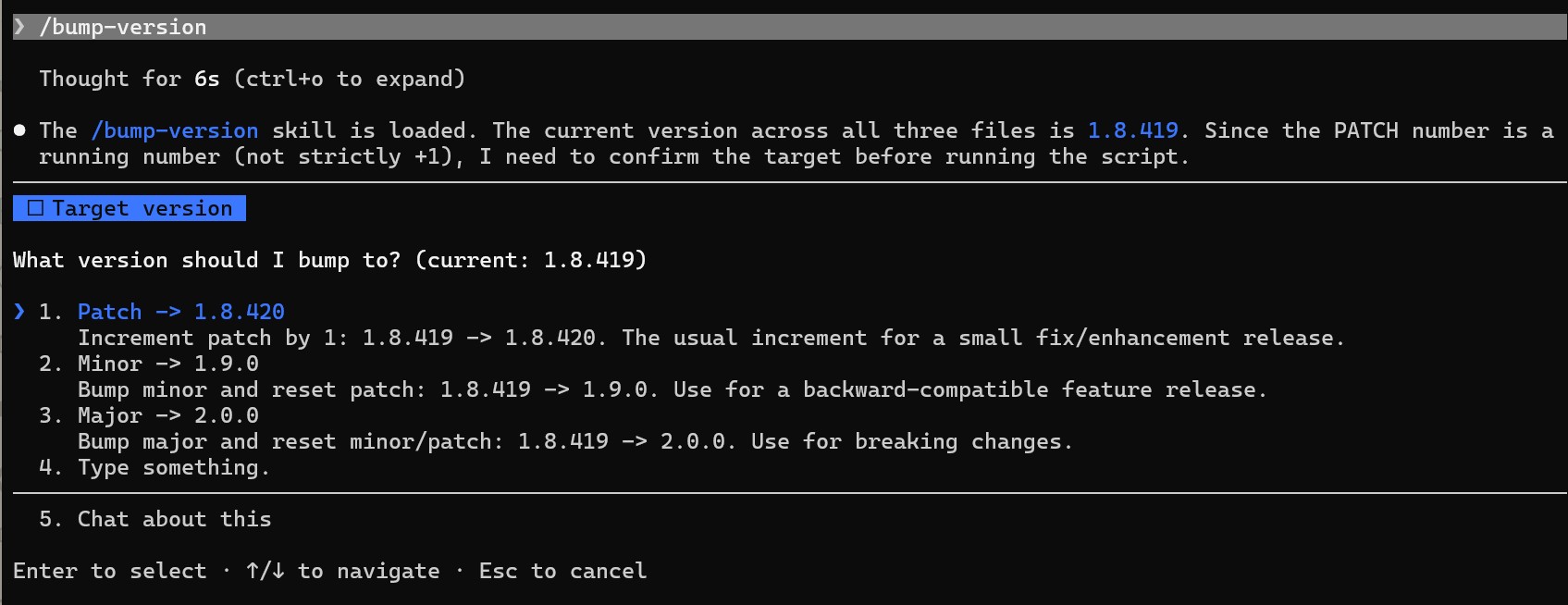
是为之记。
Alva Chien
2026.7.12